Some software requires a different version of PHP. You can switch the PHP versions using cPanel.
1. Log in to your cPanel account.
2. In the Software section, click on MultiPHP Manager.
3. Scroll down to the bottom of the page. Select your domain from the left side of the screen. You can view the PHP Version from the drop-down menu on the right. Please, select the appropriate PHP version from it and click on Apply.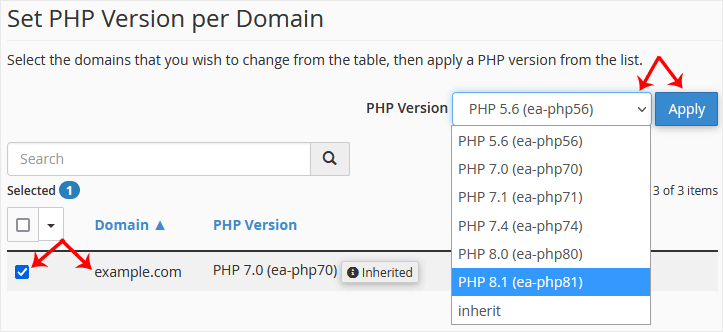
Changing the PHP version to your selected version takes a few seconds.
cPanel hesabınıza erişiminiz varsa, şifrenizi sıfırlamak için aşağıdaki...
Farklı bir stile sahip başka bir cPanel temasına geçiş yapmak kolaydır.1....
FTP programı kullanmak yerine cPanel’in dahili dosya yöneticisini...
1. Log in to your cPanel account. 2. In the Files section, click on File...
If you are getting a disk space usage warning from cPanel and don't know...