You can subscribe to an invoice for recurring payments. The subscription option is only available if you are purchasing a recurring service and the invoice due date is in the future.
1. Log in to your hosting client area.
2. Go to the Invoices section, open the unpaid invoice you want to subscribe to, and make sure you set the payment method as PayPal.
3. Click on the PayPal Subscribe.

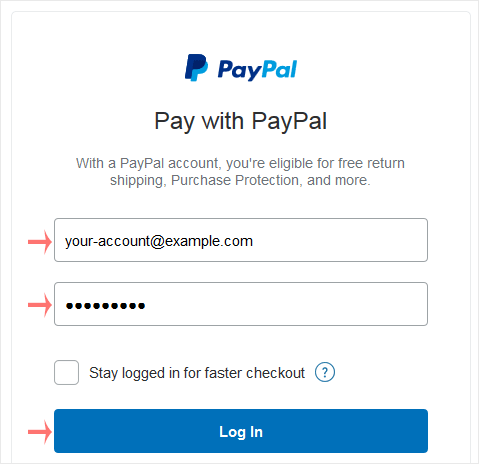
4. PayPal asks you for login details. Enter your PayPal credentials and click Log in.
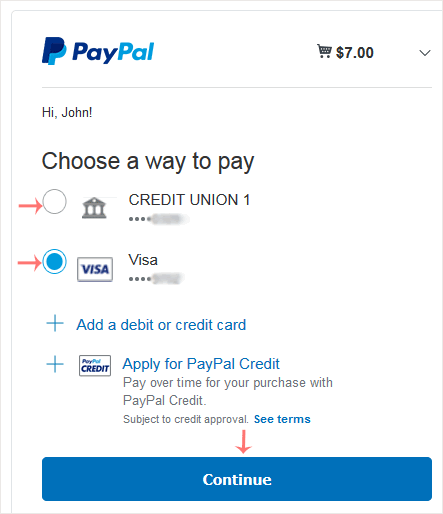
5. Choose an appropriate payment source, such as your Debit Card or another method and confirm with Continue.
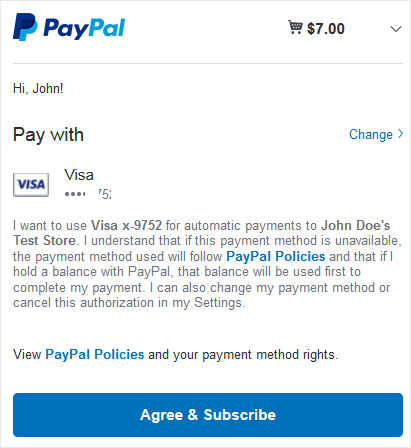
6. Check the details carefully and click Agree & Subscribe.
If everything goes right, the system notifies you that you paid the money and created a subscription. If it shows a link to Return to Merchant, click on it, and in case it is not working, you can close the browser window.
You can view the list of automatic PayPal subscriptions you have. 1....
You can cancel pre-approved, automatic payments, or a subscription in your...
Follow this tutorial to link your Debit or Credit Card to your PayPal...
Follow this tutorial to remove your Debit or Credit Card from your PayPal...
With multiple Debit or Credit cards, you can set your proffered payment...