1 Yıllık "Reseller" hizmeti alımında ÜCRETSİZ Sepette Domain Hediye! Detaylar Reseller Hosting paketlerinde..
You can remove a domain in Plesk by following this tutorial.
1. Log in to your Plesk account.
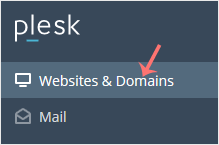
2. Click on Websites & Domains from the Sidebar Menu.
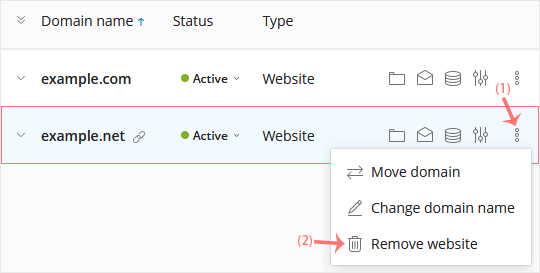
3. Under the list of domains, click on the More icon
in front of the domain and select Remove website.
4. Confirm with Yes to remove the domain.
1. Log in to your Plesk account. 2. Click on Websites & Domains from the Sidebar Menu. 3. Click on Add Subdomain. 4. Enter a subdomain name and select a domain from the Domain...
1. Log in to your Plesk account. 2. Click on Websites & Domains from the Sidebar Menu. 3. Under the list of Domain names, click on the Hosting Settings icon appearing in the same...
A subdomain is an additional part of your primary domain. Please, follow this tutorial to remove a subdomain in Plesk. 1. Log in to your Plesk account. 2. Click on Websites & Domains...
Follow this tutorial to add a new domain to your Plesk account. 1. Log in to your Plesk account. 2. Click on Websites & Domains from the Sidebar Menu. 3. Click on Add Domain....
Destek Olmak İçin Hazırız !Çözüm odaklı destek ekibimizle ihtiyacınız olan her anda yanınızdayız
© Domaintahsis Tüm hakları saklıdır. (Fiyatlara %20 KDV dahil değildir.)