You can change the root user account password from WHM.
1. Log in to your WHM Root Account.
2. Go to Server Configuration >> Change Root Password or type Change Root in the menu filter box. The option will appear. Click on it.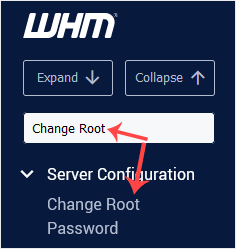
3. Enter your new password or use the password generator option to generate a new random password. Make sure that you save your new password and keep it in a safe place.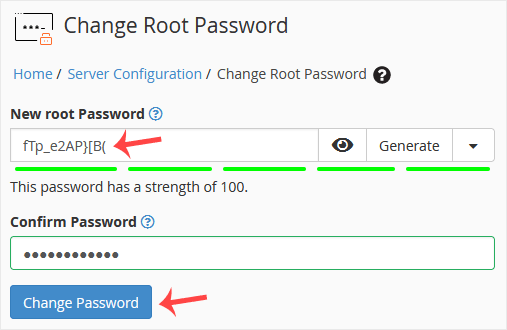
4. Click on Change Password.
Your password will be changed, and you can log in to your WHM root account with your new one.
You can change the default nameservers in your WHM Root Account. Note: Root...
Root Access is Required. You cannot access it through the WHM Reseller...
You can change the default login theme for users, which displays when they...
If you want to change the server time, you can easily do it from WHM Host...