You can remove the hosting package of your account, or, should you have root access, you can also remove the packages of other users from WHM.
1. Log in to your WHM Account.
2. Go to Packages >> Delete a Package or type Delete a Package in the menu filter box. The option will appear. Click on it.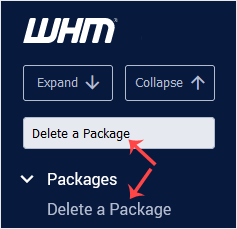
3. Under Delete a Package, select a package you want to remove and click on Delete.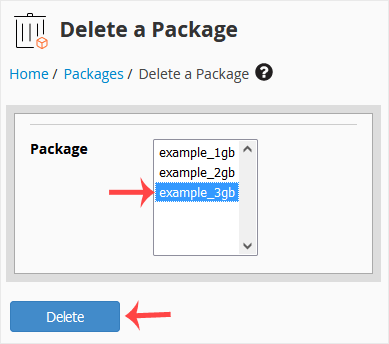
Congratulations, you have successfully removed the selected package.
You can suspend а cPanel user from accessing your WHM account. 1. Log in to...
Do you want to increase or limit cPanel user's bandwidth usage? A WHM user...
Do you want to force cPanel users to change their passwords after login? If...
You can enable/disable features of your customers' cPanel account from WHM....
You can create a feature list from your WHM Account. Feature lists allow you...