1 Yıllık "Reseller" hizmeti alımında ÜCRETSİZ Sepette Domain Hediye! Detaylar Reseller Hosting paketlerinde..

How to Generate a Certificate Signing Request - CSR in cPanel


How to Generate a Certificate Signing Request - CSR in cPanel


Obtaining a certificate from a trusted SSL provider requires a Certificate Signing Request (CSR). CSR is also needed for generating self-signed SSL certificates. Follow this tutorial to generate a CSR.


1. Log in to your cPanel account.


2. In the Security section, click on SSL/TLS.

ssl-tls-icon.gif


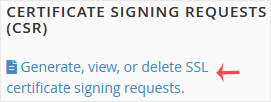
3. Under Certificate Signing Request, click on Generate, View or Delete CSR Link.
csr-select.gif


4. Scroll down and enter the following details:

  • Domains: Enter your domain name, such as www.example.com (domains with www cover both non-www and www domains)
  • City: Your city name.
  • State: Your state name.
  • Country: Choose your country name from the drop-down menu.
  • Company: Your Company name or leave it blank.
  • Company Division: Name of your company division.
  • Email: Enter your email address.
  • Passphrase: Enter a passphrase (maximum 20 characters) and do not use special characters.

csr-filling.gif


5. Finally, click on Generate. Copy the generated CSR code and save it to your computer. You can use your CSR while purchasing an SSL or reissuing an SSL in the future.
csr-generated.gif

Bu cevap yeterince yardımcı oldu mu?

Diğer Dökümanlar


  • How to Retrieve a CSR from cPanel

    Have you generated a Certificate Signing Request (CSR) from cPanel but lost it? Then, you can retrieve it. Follow this tutorial only if you have previously generated a CSR from cPanel. 1. Log in...

  • How to Remove a CSR code in cPanel

    You can remove the CSR code, which is no longer needed. Please, keep a backup of the CSR code for the active SSL on your computer. 1. Log in to your cPanel account. 2. In the Security section,...

  • How to Install an SSL on Your Domain Using AutoSSL in cPanel

    cPanel can automatically install an SSL on your domain within a few hours. However, even after 24 hours, if an SSL is not installed on your domain, first check the last log of the AutoSSL from...

  • How to Include or Exclude a Domain from AutoSSL in cPanel

    You can include or exclude your domain from AutoSSL.If your domain is newly-created, wait a few hours for the cPanel to automatically install an SSL on your domain. You can check the last log of...

Destek Olmak İçin Hazırız !Çözüm odaklı destek ekibimizle ihtiyacınız olan her anda yanınızdayız

Telefon ile Satış+90 850 302 21 19 (09:00 - 18:00) Email ile Destekdestek@diqital.net.tr (7/24 Aktif) Ticket ile Destek talebi oluştur Bilgi Bankası ile Hızlı Destek