If you are on holiday or you will be unavailable for a few days or a month, you can create an auto email responder for your emails. When people email you, they will receive an automated email with your message.
1. Log in to your cPanel account.
2. In the Email section, click on Autoresponders. 
3. From the Autoresponders page, click on Add Autoresponder.
4. Enter the following details:
5. Select the start and stop time of your autoresponder.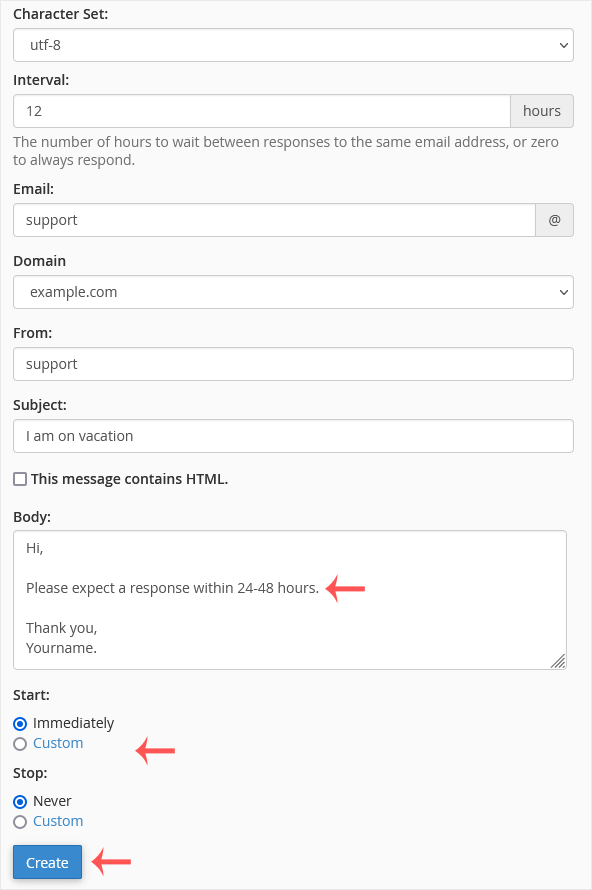
6. Click on Create.
How to remove Autoresponder?
1. In the Email section, click on Autoresponders.
2. You should see your autoresponder email list under Current Autoresponders.
3. Click on Delete on the right sight of the email address.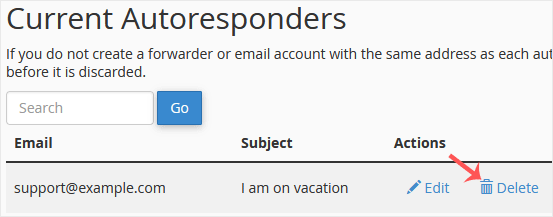
4. Confirm with Delete Autoresponder.
You can access your Email account directly from Webmail.1. Open...
You can change your email account's password through the following steps: 1....
To create a new email address, perform the following steps: 1. Log in to...
How to forward an email? 1. Log in to your cPanel account. 2. In the...